
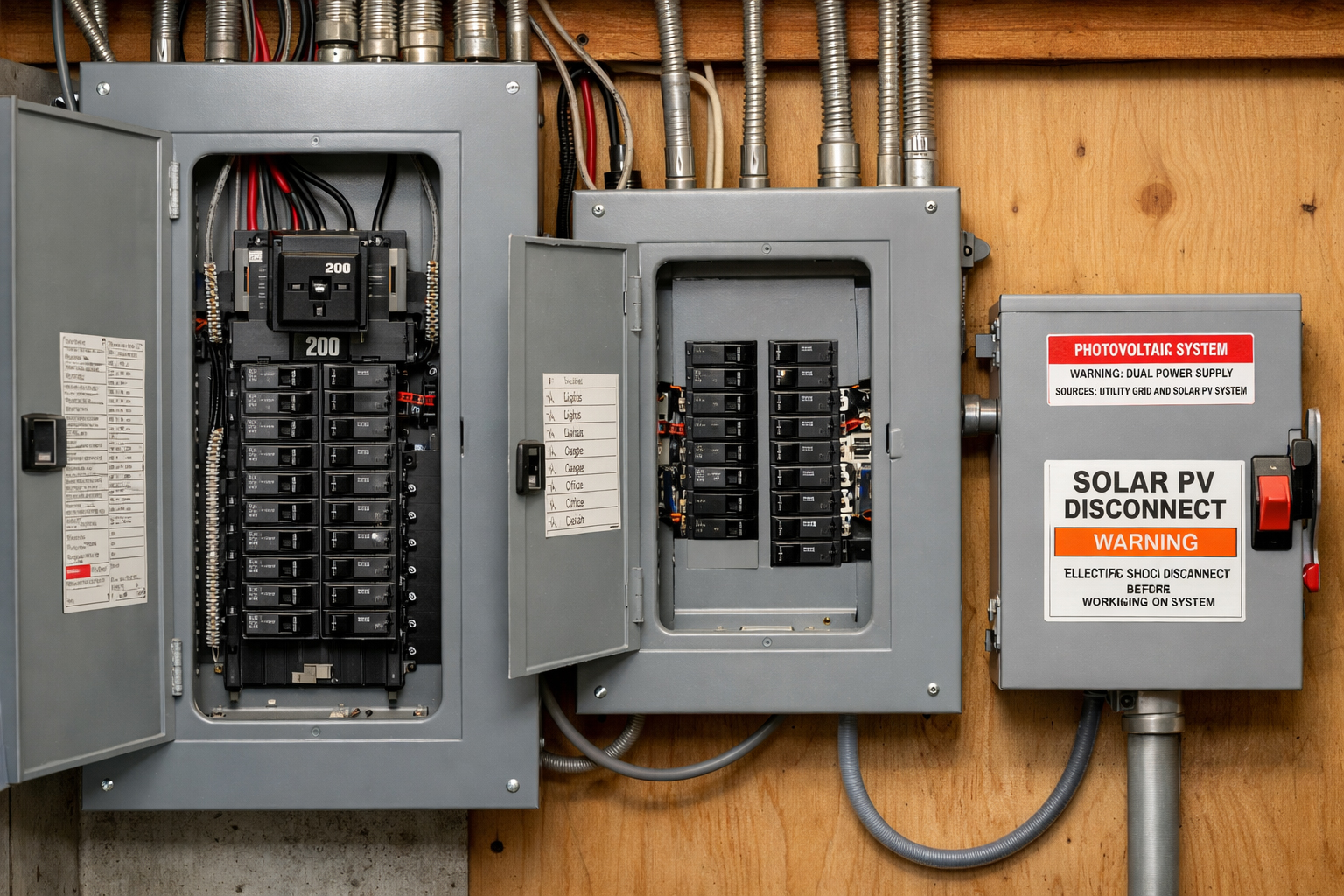
If your solar system suddenly drops to zero production, produces less than normal, or your app shows “no data,” the issue isn’t always on the roof. In the Bay Area, problems at the service entry—the area around the meter and main service panel—are common, especially with older homes, PG&E realities, and condo/HOA restrictions.
This guide is written for Bay Area homeowners, landlords, and property managers who want to understand what’s happening, what’s safe to check, and when it’s time to call a licensed professional.
Bay Area realities that affect solar troubleshooting
1) Older housing stock + service panels at capacity
A lot of Bay Area homes (San Jose, Los Gatos, Santa Clara, Fremont, Oakland, SF, and surrounding cities) have:
Older main panels with limited breaker spaces
Service equipment that wasn’t designed for modern loads (EV chargers, heat pumps, A/C, induction)
Panels that are at or near capacity, which can limit solar interconnection or trigger nuisance issues
Even if your panels and inverter are fine, the interconnection point (where solar ties into the home) can become the bottleneck.
2) PG&E / utility coordination can be part of the fix
Sometimes solar performance is impacted by the grid itself. Examples:
Voltage too high (common when export is strong midday)
Utility-side requirements when service equipment changes
Scheduling steps that affect timeline for certain scopes
If your inverter reports repeated “grid” errors, the fix may involve more than just resetting equipment.
3) Condos & HOAs add real constraints
In condos and HOA-governed properties, troubleshooting can be delayed by:
Shared electrical rooms and limited access windows
Approvals for modifications (even if it’s “just electrical”)
Restrictions on where equipment can be placed
Documentation requirements (photos, specs, diagrams)
The best outcomes usually come from having a clear scope and a simple coordination checklist.
What “service entry troubleshooting” actually means
Service entry is the part of your electrical system where power enters the property and where solar often connects:
The utility meter area
The main service panel (MSP)
Any solar AC disconnect near the meter (if present)
Sometimes a rapid shutdown / emergency switch
Monitoring components like a gateway or CTs (current sensors)
Service-entry troubleshooting is about verifying solar has a clean, stable path through the AC side of the system—not immediately jumping to roof/DC issues.
Common symptoms and what they usually point to
Symptom A: “Zero production” (flatline)
Most common causes:
Tripped PV breaker in the main panel
AC disconnect OFF
Inverter protective shutdown due to grid conditions (voltage/frequency out of tolerance)
Rapid shutdown triggered
System is producing but monitoring is offline (“no data”)
Symptom B: “Lower than normal” production
Common Bay Area causes:
Seasonal sun angle changes and marine layer/haze
New shade (trees, dormers, roof vents casting shadow)
Heat-related inverter derating on hot afternoons
Partial system offline (string down, or a few microinverters/optimizers down)
Utility voltage conditions causing curtailment during peak production
Symptom C: “It trips when the sun is strongest”
Often points to:
Grid voltage rise during high export (midday)
Weak/failing breaker or disconnect
Overheating termination points (requires professional testing)
Intermittent AC-side connection issues
Safe checks you can do (no tools, no cover removal)
⚠️ Safety note: Do not remove any panel covers or open any enclosures. Service entry areas can be hazardous even when things “seem off.”
Step 1: Confirm it’s not just monitoring
If your app says “no data,” check whether the inverter has normal lights/status
A lot of “solar is down” calls are actually gateway/internet issues, not production failures
Step 2: Check the PV breaker in the main panel
Look for a breaker that’s tripped (center position)
If tripped, you can try one reset: flip fully OFF, then back ON
If it trips again, stop and schedule service
Step 3: Check AC disconnect position (if you have one)
Confirm the handle is clearly ON
Don’t open fused disconnects—just confirm the handle position
Step 4: Make sure rapid shutdown / E-stop isn’t triggered
If you have an emergency solar shutdown switch, verify it’s in the normal operating position
Step 5: Note inverter messages or fault codes
Exact wording matters—snap a photo if possible
“Grid voltage high,” “frequency out of range,” “arc fault,” or “isolation fault” all point to different paths
Step 6: Look for new shade or obvious debris
Leaf buildup, bird nests, or new shade can noticeably reduce output
Seasonal changes are normal, but sudden drops usually signal something else
Pro tip for faster service: When you call, share:
Inverter brand (Enphase / SolarEdge / Tigo / Tesla / other)
Symptom (0 output / low / tripping / no data)
When it happens (morning vs midday)
Photo of inverter screen/lights + main panel solar breaker label
When to call a licensed electrician/solar technician
Schedule service if any of these apply:
Breaker trips repeatedly or won’t stay on
Buzzing, burning smell, heat marks, or discoloration near panel/disconnect
Inverter repeatedly shows grid errors (overvoltage / frequency issues)
Solar shuts down during peak sun and won’t stabilize
Condo/HOA requires shared access or approvals
You suspect you need a panel upgrade to support EV charging or load growth
Condo/HOA checklist (quick)
If you’re in a condo or HOA community, gather this upfront:
Building access rules (electrical room hours, roof access)
Required approval steps and turnaround times
Where equipment is allowed (visual/noise/fire access)
Any required documentation format (photos, specs, diagrams)
This reduces delays and gets you scheduled faster.
FAQ
Is “no production” always a roof/panel problem?
No. Many cases are AC-side/service-entry related (breaker/disconnect/grid conditions) or monitoring-only.
Why would an inverter shut down during peak hours?
Often due to grid conditions (voltage/frequency) or overheating/weak connections on the AC side. A licensed pro can test and confirm.
Why does condo troubleshooting take longer?
Shared access, approvals, and building restrictions add steps—even if the fix is simple.